[](https://github.com/apache/incubator-streampipes/actions/)
[](https://hub.docker.com/r/apachestreampipes/backend/)
[](https://img.shields.io/maven-central/v/org.apache.streampipes/streampipes-backend.svg)
[](http://www.apache.org/licenses/LICENSE-2.0)
[]()
[](https://twitter.com/StreamPipes)
[](https://dashboard.cypress.io/projects/q1jdu2/runs)

Self-Service Data Analytics for the (Industrial) IoT
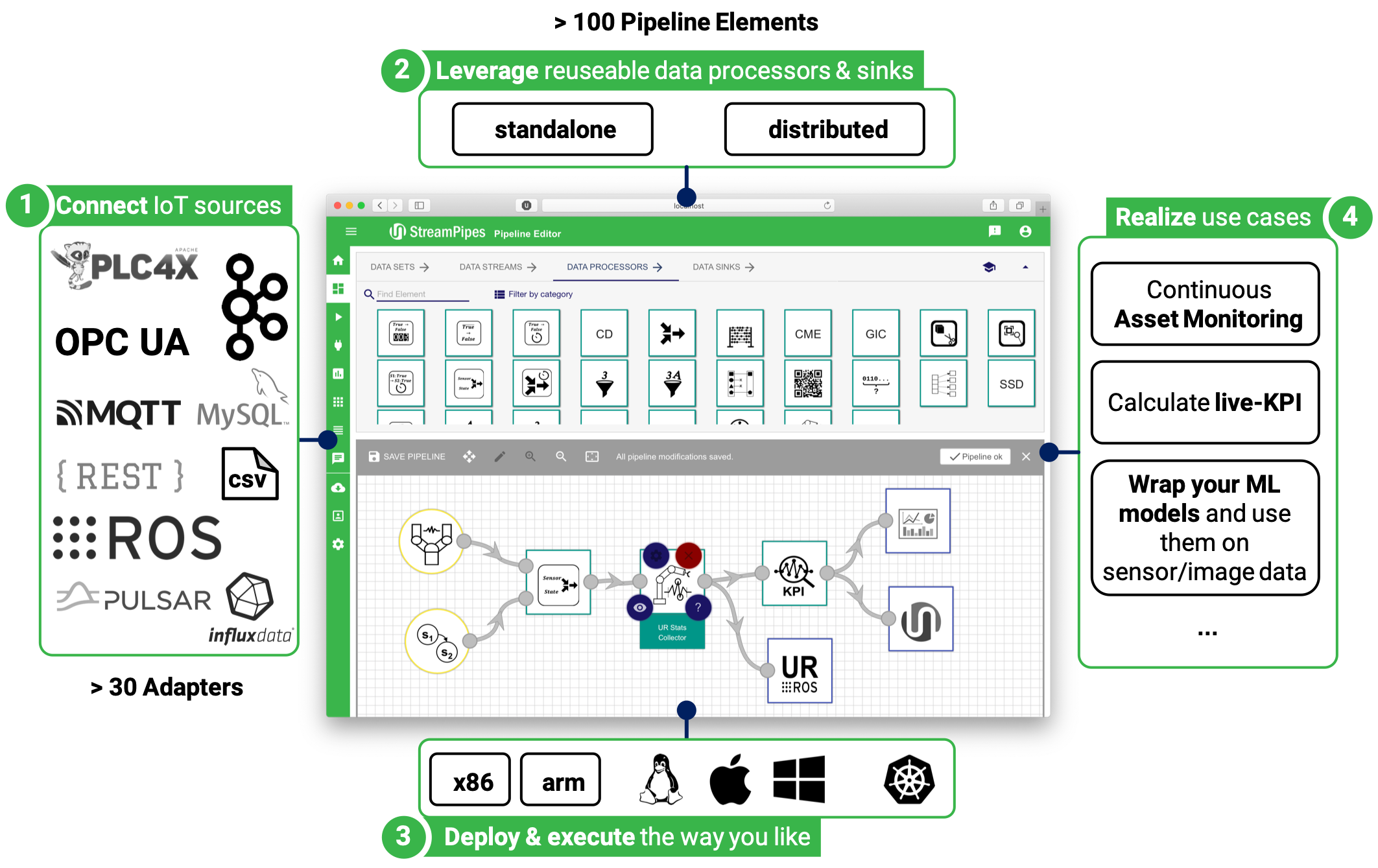
StreamPipes is a self-service (Industrial) IoT toolbox to enable non-technical users to connect
, analyze and explore IoT data streams.
***
## Table of contents
* [About Apache StreamPipes](#about-apache-streampipes)
* [Use Cases](#use-cases)
* [Installation](#installation)
* [Building StreamPipes](#building-streampipes)
* [Pipeline Elements](#pipeline-elements)
* [Extending StreamPipes](#extending-streampipes)
* [Bugs and Feature Requests](#bugs-and-feature-requests)
* [Get help](#get-help)
* [Contribute](#contribute)
* [Feedback](#feedback)
* [License](#license)
***
## About Apache StreamPipes
Apache StreamPipes (incubating) enables flexible modeling of stream processing pipelines by providing a graphical
modeling editor on top of existing stream processing frameworks.
It empowers non-technical users to quickly define and execute processing pipelines based on an easily extensible
toolbox of data sources, data processors and data sinks. StreamPipes has an exchangeable runtime execution layer and
executes pipelines using one of the provided wrappers, e.g., standalone or distributed in Apache Flink.
Pipeline elements in StreamPipes can be installed at runtime - the built-in SDK allows to easily implement new
pipeline elements according to your needs. Pipeline elements are standalone microservices that can run anywhere -
centrally on your server, in a large-scale cluster or close at the edge.
## Use Cases
StreamPipes allows you to connect IoT data sources using the SDK or the built-in graphical tool **StreamPipes
Connect**.
The extensible toolbox of data processors and sinks supports use cases such as
* Continuously **store** IoT data streams to third party systems (e.g., databases)
* **Filter** measurements on streams (e.g., based on thresholds or value ranges)
* **Harmonize** data by using data processors for transformations (e.g., by converting measurement units and data types
or by aggregating measurements)
* **Detect situations** that should be avoided (e.g., patterns based on time windows)
* Wrap **Machine Learning models** into data processors to perform classifications or predictions on sensor and image data
* **Visualize** real-time data from sensors and machines using the built-in Live Dashboard
## Installation
The quickest way to run StreamPipes including the latest extensions (adapters, pipeline elements) is by using our Docker-based [installation & operation options](installer), namely:
* **[StreamPipes Compose](installer/compose)** - The User's Choice
* **[StreamPipes CLI](installer/cli)** - The Developer's Favorite
* **[StreamPipes k8s](installer/k8s)** - The Operator's Dream
> **NOTE**: StreamPipes CLI & k8s are highly recommended for developers or operators. Standard users should stick to StreamPipes Compose.
Please follow the instructions provided in the corresponding `README.md` to get started.
For a more in-depth manual, read the [installation guide](https://streampipes.apache.org/docs/docs/try-installation.html).
## Building StreamPipes
To properly build the StreamPipes core, the following tools should be installed:
### Prerequisites
* Java 11 JDK (minimum)
* Maven (tested with 3.8)
* NodeJS + NPM (tested with v12+/ v6+)
* Docker + Docker-Compose
### Building
To build the core project, do the following:
```
mvn clean package
```
To build the ui, switch to the ``ui`` folder and perform the following steps:
```
npm install
# for NPM > v7, run npm install --legacy-peer-deps
npm run build
```
### Starting
To start StreamPipes, run ``docker-compose up --build -d`` from the root directory.
You can also use the installer or CLI as described in the ``Installation`` section.
## Pipeline Elements
StreamPipes includes a repository of extensions for
* **Connect adapters** for a variety of IoT data sources as well as
* **Data Processors** and **Data Sinks** as ready-to-use pipeline elements.
A description of the standard elements can be found in [streampipes-extensions](https://github.com/apache/incubator-streampipes/tree/dev/streampipes-extensions).
## Extending StreamPipes
You can easily add your own data streams, processors or sinks. A [Java-based SDK](https://streampipes.apache.org/docs/docs/dev-guide-tutorial-processors) and several [run-time wrappers](https://streampipes.apache.org/docs/docs/dev-guide-architecture) for popular streaming frameworks such as Apache Flink and Apache
Kafka Streams (and also plain Java programs) can be used to integrate your existing processing logic into StreamPipes. Pipeline elements are packaged as Docker images and can be installed at runtime, whenever your requirements change.
Check our developer guide at [https://streampipes.apache.org/docs/docs/dev-guide-introduction](https://streampipes.apache.org/docs/docs/dev-guide-introduction).
## Bugs and Feature Requests
If you've found a bug or have a feature that you'd love to see in StreamPipes, feel free to create an issue in our Jira:
[https://issues.apache.org/jira/projects/STREAMPIPES](https://issues.apache.org/jira/projects/STREAMPIPES)
## Get help
If you have any problems during the installation or questions around StreamPipes, you'll get help through one of our
community channels:
- [Mailing Lists](https://streampipes.apache.org/mailinglists.html)
And don't forget to follow us on [Twitter](https://twitter.com/streampipes)!
## Contribute
We welcome contributions to StreamPipes. If you are interested in contributing to StreamPipes, let us know! You'll
get to know an open-minded and motivated team working together to build the next IIoT analytics toolbox.
Here are some first steps in case you want to contribute:
* Subscribe to our dev mailing list [dev-subscribe@streampipes.apache.org](dev-subscribe@streampipes.apache.org)
* Send an email, tell us about your interests and which parts of Streampipes you'd like to contribute (e.g., core or UI)!
* Ask for a mentor who helps you understanding the code base and guides you through the first setup steps
* Find an issue in our [Jira](https://issues.apache.org/jira/projects/STREAMPIPES) which is tagged with a _newbie_ tag
* Have a look at our developer wiki at [https://cwiki.apache.org/confluence/display/STREAMPIPES](https://cwiki.apache.org/confluence/display/STREAMPIPES) to learn more about StreamPipes development.
Have fun!
## Feedback
We'd love to hear your feedback! Subscribe to [users@streampipes.apache.org](mailto:users@streampipes.apache.org)
## License
[Apache License 2.0](LICENSE)